-
Table of Contents
Comparing QuickBooks Desktop to QuickBooks Online
When it comes to managing finances for a business, QuickBooks is a popular choice among small and medium-sized enterprises. However, many business owners often find themselves torn between QuickBooks Desktop and QuickBooks Online. Both versions offer unique features and benefits, but which one is the right fit for your business? Let’s delve into a detailed comparison of QuickBooks Desktop and QuickBooks Online to help you make an informed decision.
Cost and Accessibility
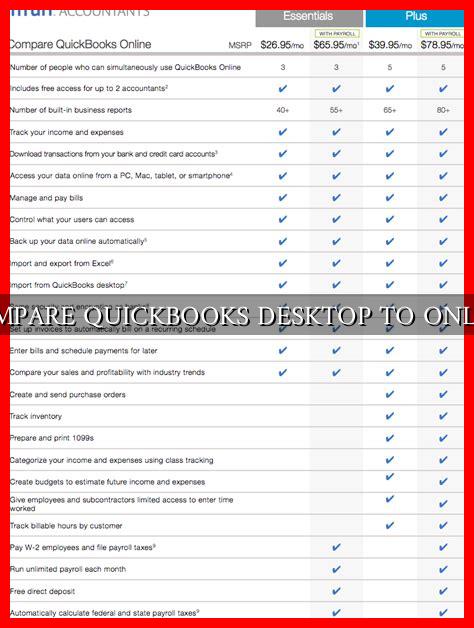
One of the key differences between QuickBooks Desktop and QuickBooks Online is the pricing structure. QuickBooks Desktop requires a one-time purchase, with the option to upgrade to a newer version every few years. On the other hand, QuickBooks Online operates on a subscription-based model, with monthly fees based on the plan you choose.
- QuickBooks Desktop: Initial cost of software, with the option to upgrade every few years.
- QuickBooks Online: Monthly subscription fees based on the plan you choose.
QuickBooks Online offers the advantage of accessibility from anywhere with an internet connection, making it a convenient option for businesses with remote teams or multiple locations.

. QuickBooks Desktop, on the other hand, is limited to the device on which it is installed, which may not be ideal for businesses with a need for mobility.
Features and Functionality
Both QuickBooks Desktop and QuickBooks Online offer a range of features to help businesses manage their finances effectively. QuickBooks Desktop is known for its robust functionality, with advanced reporting capabilities and industry-specific versions available. It is often preferred by businesses with complex accounting needs or specific industry requirements.
QuickBooks Online, on the other hand, is designed for ease of use and accessibility. It offers features such as automatic data backup, mobile access, and integration with third-party apps. While QuickBooks Online may not have the same level of customization as QuickBooks Desktop, it is a user-friendly option for businesses looking for a streamlined accounting solution.
Security and Data Protection
Security is a critical consideration when choosing an accounting software for your business. QuickBooks Desktop stores data locally on your computer, which may pose a risk in case of hardware failure or theft. However, you have full control over your data and can implement your own security measures.
QuickBooks Online, on the other hand, stores data in the cloud, offering automatic backups and data encryption for enhanced security. While some businesses may have concerns about data privacy in the cloud, QuickBooks Online adheres to strict security protocols to protect your information.
Integration and Scalability
Integration with other business tools and scalability are important factors to consider when choosing an accounting software. QuickBooks Desktop offers a wide range of integrations with third-party apps and software, allowing businesses to customize their accounting system to suit their needs.
QuickBooks Online also offers integration with popular business tools, such as PayPal, Shopify, and TSheets. Additionally, QuickBooks Online is designed to scale with your business, allowing you to easily upgrade to a higher plan as your business grows.
Conclusion
Ultimately, the choice between QuickBooks Desktop and QuickBooks Online depends on your business’s specific needs and preferences. QuickBooks Desktop is a robust solution for businesses with complex accounting requirements, while QuickBooks Online offers accessibility and ease of use for businesses looking for a cloud-based solution.
Before making a decision, consider factors such as cost, features, security, integration, and scalability to determine which version of QuickBooks is the best fit for your business. Whichever option you choose, QuickBooks remains a reliable and trusted accounting software that can help streamline your financial management processes.