-
Table of Contents
Using Kafka in Spring Boot
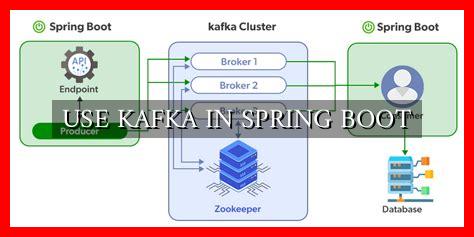
Apache Kafka is a distributed streaming platform that is widely used for building real-time data pipelines and streaming applications. It provides a scalable, fault-tolerant, and high-throughput messaging system that allows you to publish and subscribe to streams of records in a fault-tolerant way. In this article, we will explore how to integrate Kafka with a Spring Boot application to leverage its powerful features.
Setting up Kafka in Spring Boot
Integrating Kafka with a Spring Boot application is relatively straightforward. You can start by adding the Kafka dependencies to your pom.xml file:
“`xml
org.springframework.kafka
spring-kafka
“`
Next, you need to configure the Kafka properties in your application.properties file:
“`properties
spring.kafka.bootstrap-servers=localhost:9092
spring.kafka.consumer.group-id=my-group
“`
Producing Messages with KafkaTemplate
Once you have set up Kafka in your Spring Boot application, you can start producing messages using the KafkaTemplate class. Here’s an example of how you can send a message to a Kafka topic:
“`java
@Autowired
private KafkaTemplate kafkaTemplate;
public void sendMessage(String message) {
kafkaTemplate.send(“my-topic”, message);
}
“`
Consuming Messages with @KafkaListener
To consume messages from a Kafka topic, you can use the @KafkaListener annotation in your Spring Boot application.

. Here’s an example of how you can listen for messages on a specific topic:
“`java
@KafkaListener(topics = “my-topic”, groupId = “my-group”)
public void listen(String message) {
System.out.println(“Received message: ” + message);
}
“`
Benefits of Using Kafka in Spring Boot
- Scalability: Kafka allows you to scale your application horizontally by adding more Kafka brokers to handle increased message throughput.
- Reliability: Kafka provides fault-tolerant messaging with built-in replication and partitioning to ensure that messages are not lost.
- Real-time Processing: Kafka enables real-time data processing by allowing you to consume messages as soon as they are produced.
Case Study: Using Kafka in E-commerce
Many e-commerce companies use Kafka in their Spring Boot applications to handle real-time order processing, inventory management, and customer notifications. By leveraging Kafka’s scalability and fault-tolerance, these companies can ensure that their systems are always up and running, even during peak traffic periods.
Conclusion
Integrating Kafka with a Spring Boot application can provide numerous benefits, including scalability, reliability, and real-time processing capabilities. By following the steps outlined in this article, you can easily set up Kafka in your Spring Boot application and start building powerful streaming applications. Whether you are working on e-commerce, finance, or any other industry, Kafka can help you handle large volumes of data in a reliable and efficient manner.
For more information on using Kafka in Spring Boot, you can refer to the official Spring Kafka documentation.