Table of Contents
USER INPUT IN JAVA
Java is a versatile and powerful programming language that is widely used for developing various applications, from web applications to mobile apps. One key aspect of Java programming is handling user input, which allows users to interact with the program and provide data for processing. In this article, we will explore the importance of user input in Java, how to capture user input, and best practices for handling user input effectively.
Importance of User Input
User input is essential for creating interactive and dynamic applications that can respond to user actions. Without user input, programs would be static and limited in functionality. By allowing users to input data, Java programs can perform calculations, display information, and respond to user commands in real-time.
Capturing User Input
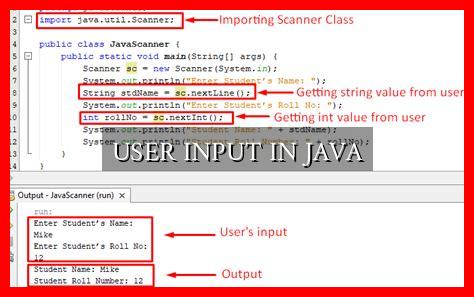
In Java, user input can be captured using various methods, such as the Scanner class, BufferedReader class, and JOptionPane class.

. The Scanner class is commonly used to read input from the console, while the BufferedReader class is used for reading input from files or other sources. The JOptionPane class provides a graphical user interface for capturing user input in dialog boxes.
Example using Scanner class:
“`java
import java.util.Scanner;
public class UserInputExample {
public static void main(String[] args) {
Scanner scanner = new Scanner(System.in);
System.out.print(“Enter your name: “);
String name = scanner.nextLine();
System.out.println(“Hello, ” + name + “!”);
}
}
“`
Best Practices for Handling User Input
- Validate user input to ensure it meets the expected format and constraints.
- Handle exceptions that may occur when reading user input to prevent program crashes.
- Use appropriate data types for storing user input, such as int for integers and String for text.
- Provide clear instructions and prompts to guide users on how to input data.
Case Study: User Input Validation
One common issue when handling user input is input validation, which ensures that the data entered by the user is valid and meets the required criteria. For example, in a form that asks for a user’s age, input validation can check if the entered age is a positive integer within a certain range.
By implementing input validation, developers can prevent errors and security vulnerabilities that may arise from invalid user input. This can improve the overall user experience and the reliability of the application.
Conclusion
Handling user input in Java is a crucial aspect of programming that allows developers to create interactive and dynamic applications. By capturing user input effectively and following best practices for input validation, developers can enhance the functionality and usability of their Java programs. Remember to always validate user input, handle exceptions, and provide clear instructions to ensure a smooth user experience.
For more information on user input in Java, you can refer to the official Java documentation here.